
The Duct Bank Window
Set the horizontal and vertical spacing, choose the alignment, and apply.
Last updated July 19, 2026
The Duct Bank Configuration window arranges your conduits into the bank and shows a live preview with dimensions. Each conduit is drawn to scale and coloured by diameter (see the Legend).
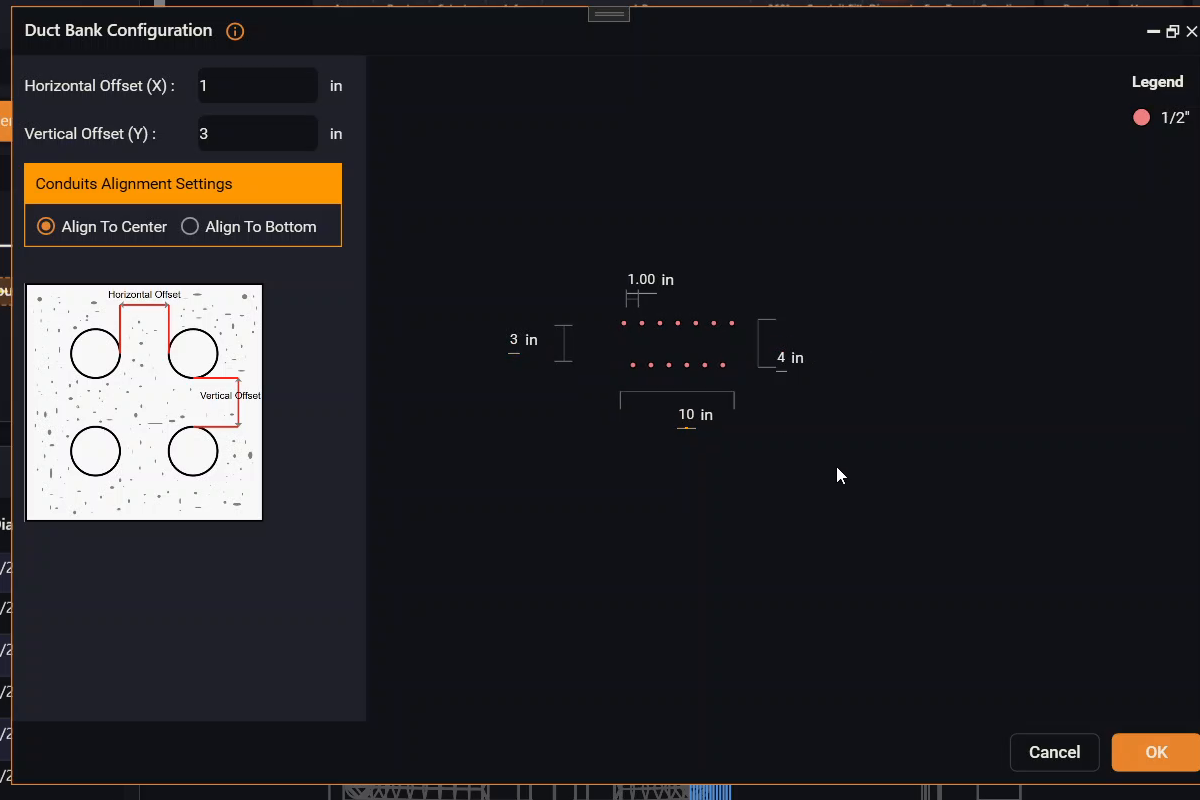
- Horizontal Offset (X) — the spacing between conduits sitting side by side in
a row (for example
1 in). - Vertical Offset (Y) — the spacing between rows (for example
3 in). - Conduits Alignment — Align to Center (default) or Align to Bottom — how the rows line up.
- The total width of the bank (shown as a dimension, e.g.
10 in) controls how many conduits fit per row — when a row fills up, the next conduit wraps to a new row below. The preview also shows the resulting total height. - OK applies the duct bank to your routes; Cancel discards it.
The small diagram on the left explains what the horizontal and vertical offsets mean. If the area already had a duct bank, the window reopens with that configuration so you can keep editing it.